JotDrop is free, and it stays free 250 MB of private sync, no card needed See plans
JotDrop
Log inStart free

psst, this one stays yours

Your notes.
Yours. Really.

A Google Keep alternative with familiar cards, private sync and files you own. Keep the ease. Lose the lock-in.

Free, and it stays free. The apps are open source. The Free plan comes with 250 MB of private sync, has no end date and needs no card.

A little space for everything.
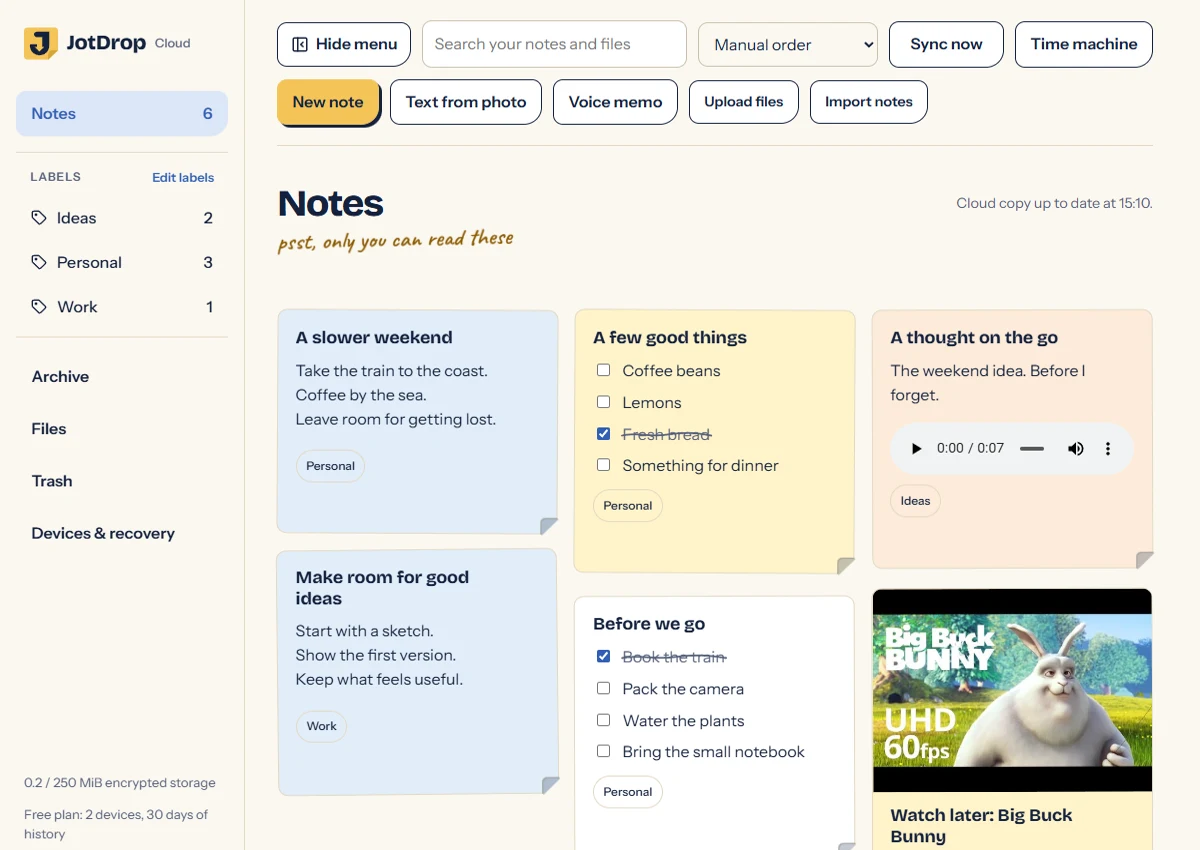
Real JotDrop cards: a voice memo, a saved YouTube video with its thumbnail, checklists and ideas
Not just a card.
Your own .md file.
all the little things, in one place.

Jot it down.
Find it again.

For the idea you might forget. The note you can't find.
And the version you wish you hadn't changed.

Create a note, choose a colour, save. Actual web app, sample notes.
Photos & text recognitionPDFs & other filesVoice memosDrawingsShared notes & listsRecurring reminders on AndroidLabels & named colours

your thoughts. not our business.

To you, a thought.
To us, gibberish.

Your notes and attachments are encrypted on your device, before upload. We store the encrypted result. We don't have the key to read that content. That's end-to-end encryption. Included on Free.

01 / ON YOUR DEVICEYour key stays on your devices.
02 / WHAT OUR CLOUD STORES
Encrypted bytes, not readable notes.
Run the demo to see real ciphertext.
No readable copy for us.No server-side decryption key.
03 / BACK ON YOUR DEVICEOnly your authorised device turns it back into your note.

Illustration of the Cloud workflow. The interactive demo uses real AES-256-GCM inside this browser. Nothing is uploaded.

What this protects, and what it doesn't

Protected in Cloud: note content and synced attachments, using authenticated encryption. JotDrop's code uses AES-256-GCM and an Argon2id passphrase wrapper. Encrypted key material is not a readable decryption key.

Still your responsibility: protect your device and recovery code. Local Markdown files aren't automatically encrypted. Cloud encryption does not hide account or billing data, or all operational metadata. An unlocked or compromised device can expose your notes.

No absolute safety promise: open source lets people inspect the implementation; it is not an independent security audit. This small demo explains the idea, rather than proving the whole product is secure. Read the actual crypto code.

Obsidian

Quick cards.
Meet your second brain.

Looking for a Google Keep alternative inside Obsidian? Turn your notes folder into a visual card board.

And behind every card? An ordinary Markdown file. Open it, link it, edit it. It's already in your vault.

Want to sketch it? Tap the pencil, draw with your mouse, a pen or a finger, and the drawing becomes a card you can open and change later.

Get the Obsidian plugin

a small thought can become something big.

Actual plugin, disposable demo vault. A card and its Markdown, side by side.
Joplin

Love Joplin?
Give it cards.

Looking for a Google Keep style view in Joplin? Turn the notes you already have into a colourful card board, on desktop and Android.

Pin it. Colour it. Tick it off right on the card. Drag it where you want it. Your notes stay in Joplin, and so does your sync.

On desktop, put a drawing on the board and draw on it again whenever you like.

Catching ideas on your phone? Connect JotDrop Cloud and the JotDrop app sends voice memos, links and photos straight to your board.

Get JotDrop for Joplin

same notes. whole new view.

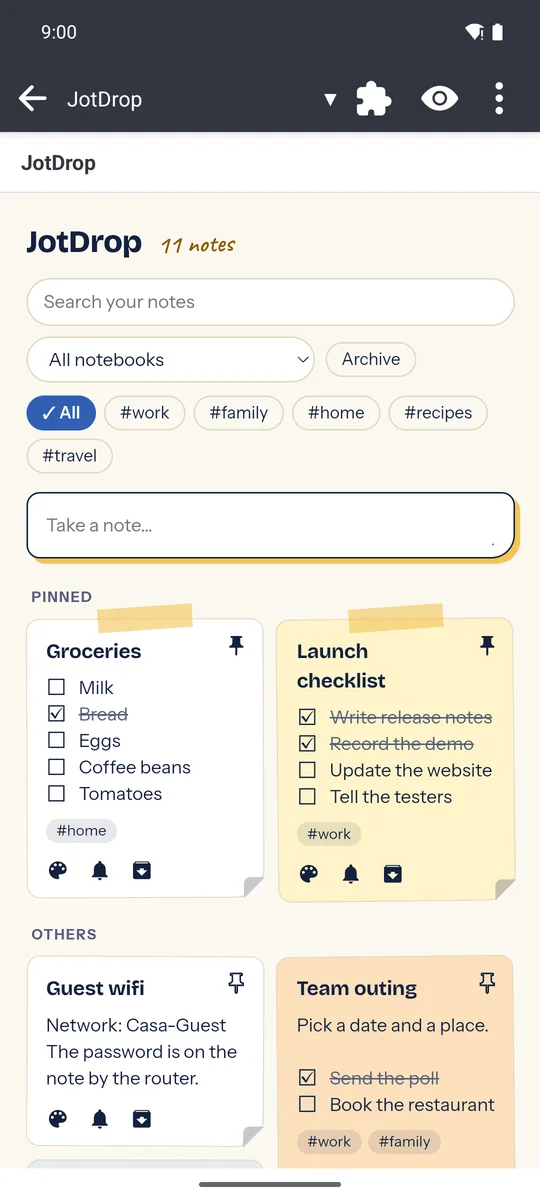
The JotDrop board in Joplin for Android, with pinned notes and colourful cards
Actual plugin, disposable demo notes. On Joplin desktop and Android.
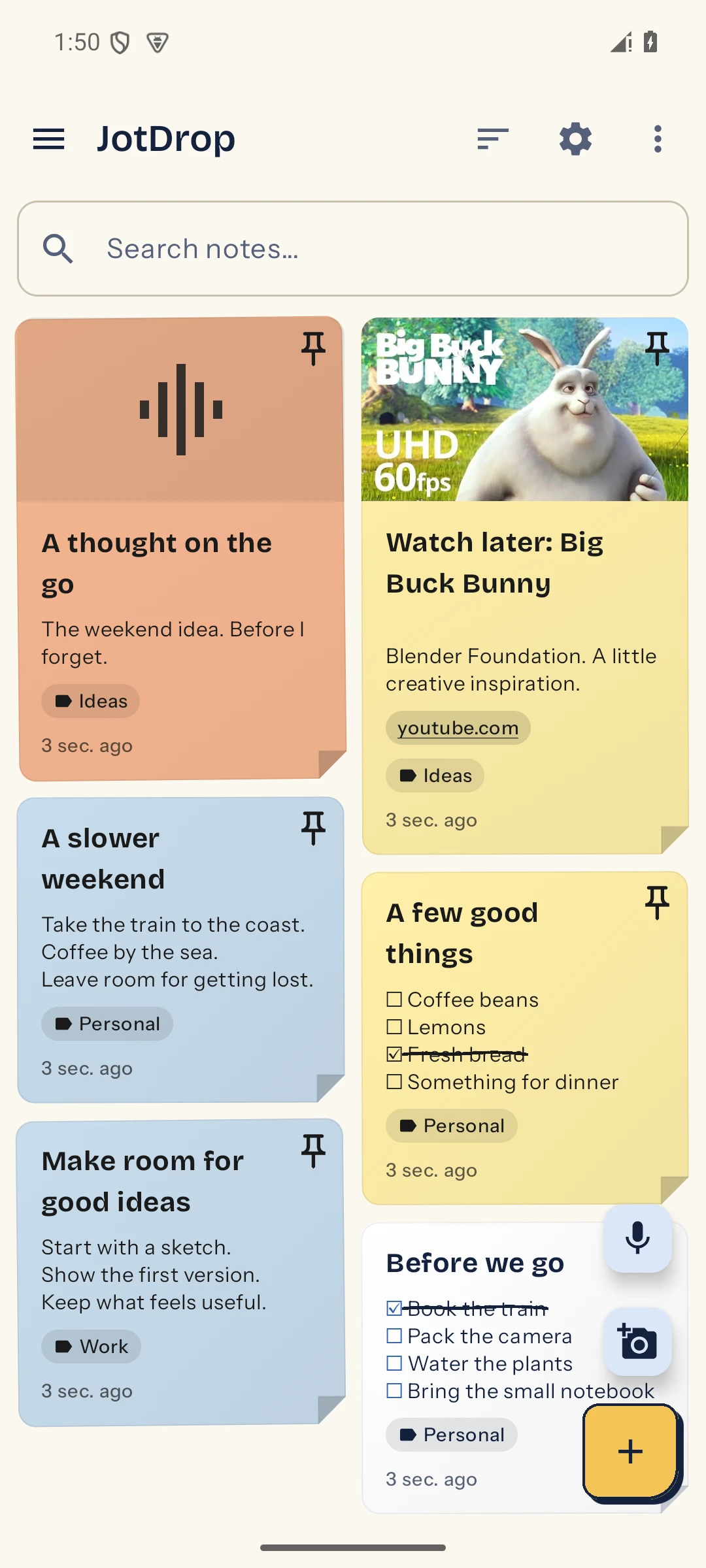
The native JotDrop Android app showing a voice memo, a YouTube preview and colourful checklist cards

out of your head.
into your pocket.

Voice. Photos. Links. Little lists.
Actual Android app. Synthetic demo notes.
Android

Good ideas don't
wait for a desk.

Speak a thought. Snap a photo. Share a link to JotDrop from another app. Keep the moment before it gets away.

Say it instead.Voice memos for the thoughts that arrive when your hands are busy. Hold the JotDrop icon on your home screen and tap Voice memo to start right away.

Keep the picture, too.Photos and available link thumbnails make your cards easier to recognise.

Keep the PDF, too.Share a PDF or any other file to JotDrop from your mail or a chat app, then start a new note or add it to one you already have. A card shows the file as a small chip with its name and size.

Draw it.Sketch with a finger: six colours, each with its name, three pen sizes and an eraser that takes a whole line. Open the drawing later and keep going, here, on the web, in Obsidian or in Joplin.

Share the list.Send an invite link and tick things off together, still end-to-end encrypted.

Right on your home screen.Add a widget with buttons for a note, a voice memo or a photo. Or put a checklist there and tick it off without opening the app.

A backup every week.With Plus, the app saves a ZIP of your notes to a folder you pick, once a week, and keeps the last four. The ZIP itself isn't encrypted, so pick a safe place.

AI that stays on the phone.Ask JotDrop can run Gemma 4 from Google on the phone itself, with no key. Ask for a list, summarize a note, read a photo or write out a voice memo. You download the model once, 2.6 GB or more, and after that your notes stay on your phone. It needs a phone with at least 6 GB of memory, and a small model can get things wrong, so check what it made.

Your files. On your phone.Local notes work offline. Sync when you're connected.

Get it on Google Play

Prefer an APK? Every version is also on GitHub releases. No iOS app is promised; the web app works on an iPhone.

for the papers you can never find.

Your paper drawer.
Now in your pocket.

The insurance letter. The warranty. The passport you renew once every ten years. Scan it with your phone and JotDrop keeps the page, a PDF and every word on it. A week before something runs out, JotDrop tells you.

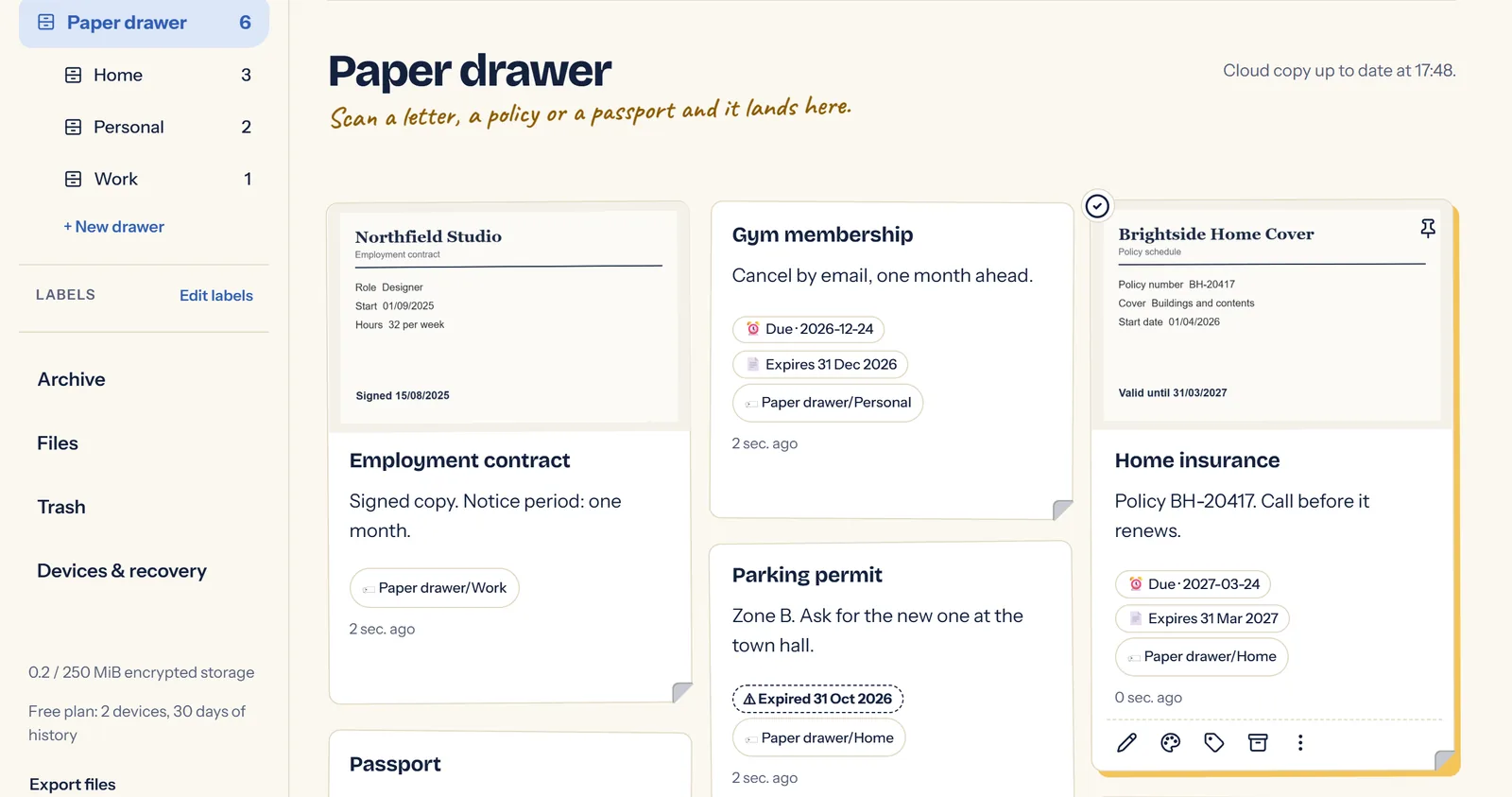
The Paper drawer in the JotDrop web app: small drawers Home, Personal and Work in the sidebar, scanned letters as cards, and badges that say Expires 31 Mar 2027 and Expired 31 Oct 2026
Actual web app. Synthetic papers, made-up companies.
  1. 01

    Scan it.

    Tap Scan document in the Android app. The scanner finds the edges and straightens the page. JotDrop reads the text, so a search for “policy” finds the letter later.

  2. 02

    Drop it in a drawer.

    Personal, Work, Home, or a drawer you name yourself. Found an expiry date on the page? JotDrop suggests it, and you decide. It reads dates in more than 25 languages, Hindi and Chinese too.

  3. 03

    Hear about it in time.

    A reminder comes a week before the date, or whenever you choose. The card says Expires 31 Mar 2027 in words, with an icon, and Expired once the day has passed.

Free on every plan. Scanning needs the Android app with Google Play services. Your drawers, search and expiry dates also work in the web app, Obsidian and Joplin. With JotDrop Cloud, your scans are end-to-end encrypted like every other note.

Chrome

That tab you meant to save.

Keep the link, your selected text and a little context.
Not another open tab you'll forget why you opened.

Big Buck Bunny video thumbnail, Blender Foundation
Something worth keeping.A YouTube video, an article, an idea.
Actual popup; simulated local hand-off.
A saved YouTube card in JotDrop, including its thumbnail and source link
a link with a little more life.

for the note you can’t quite remember.

AI in your notes.
Without us seeing them.

Ask JotDrop is an assistant inside the app. Ask what the wifi code at the cabin was, put milk on the list, summarize a long note or turn a plan into a checklist. Point it at a voice memo and it writes it out. Point it at a photo of a receipt and it files it in your Paper drawer. It uses an AI service you pick, with your own key, and your request goes straight from your device to that service. JotDrop’s server is not in between. On Android it can also run on the phone itself, with no key at all. New notes appear right away. A change to a note waits for your yes.

You

What’s the wifi code at the cabin?

What goes along: Cabin, Shopping, Garage keys (3 notes)

Ask JotDrop

The cabin wifi is pinecone-2026, from your note “Cabin”.

AI answer from Claude.

Check it before you rely on it.

Illustration of a conversation, not a screenshot.
  1. 01

    Pick your AI service.

    Claude, OpenAI, Gemini, OpenRouter, or a model on your own computer such as Ollama. Paste your key. It stays on your device, unless you turn on one key on all your devices. Or, on Android, pick “On this phone” and skip the key.

  2. 02

    See what goes along.

    Before anything is sent, you see which notes go with your question, at most 20, and you can untick any of them. A photo, PDF or voice memo goes only when you tick it.

  3. 03

    Ask. Then decide.

    It can’t delete, archive or share a note. When it wants to change one, you see the change first and nothing happens until you say so.

for the assistant that keeps asking.

Your AI knows your notes.
We still don't.

Connect Claude, Cursor, Hermes Agent or another MCP agent to JotDrop. Ask it to put milk on the list, find the warranty for the washing machine or turn a plan into a checklist. The connection runs on your own computer and decrypts your notes there, so JotDrop Cloud still only gets encrypted files. Your agent can make and change notes, never delete them.

You

Put milk and bread on my shopping list.

search_notes “shopping” · append_to_note

Your agent

Done. Milk and bread are on your Shopping list.

Shopping
  • ☐ eggs
  • ☐ milk
  • ☐ bread

on your phone at the next sync

Illustration of a conversation, not a screenshot.
  1. 01

    Make a pairing code.

    In JotDrop, choose Create pairing code under Connected devices. Your agent joins your account as one more device, with the name you give it.

  2. 02

    Connect your agent.

    Run npx -y jotdrop-mcp connect on your own computer, paste the code and add one line to Claude, Cursor or Hermes Agent.

  3. 03

    Just ask.

    “What’s on my shopping list?” “Remind me about the warranty in March.” Your agent searches, reads and writes, and the change shows up in the app.

for your “wait, undo that” moments.

The good version.
Not gone after all.

Overwrote an idea? Changed the wrong note? Time Machine lets you revisit a saved version of your board. Look first. Restore only when you're ready.

Actual web app, including a confirmed restore. Synthetic notes and staged dates.
  1. 01

    Choose a saved moment.

    Open Time Machine and move the slider back. The board shows the notes as they were then.

  2. 02

    Look before you leap.

    Read the old text and check the board. This is a read-only preview; looking changes nothing. For a single note, Compare with current marks added lines with + and removed lines with − and a strikethrough.

  3. 03

    Confirm. Bring it back.

    Choose Restore this moment to restore the available board state. JotDrop saves new versions rather than erasing the history.

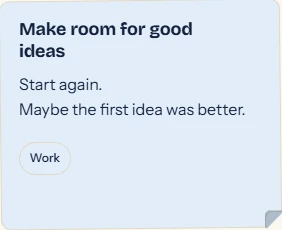
Oops. The good idea is gone.Before restoring: the demo project note was overwritten with Start again
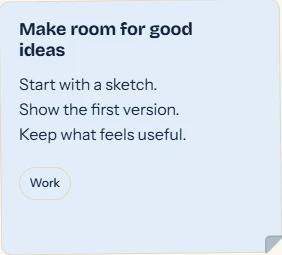
There it is. Back in your notes.After a confirmed restore: the original Start with a sketch text is back
Two actual states of the same demo note.

How far back can you go?

FreeAccess available versions from the last 30 days.

Plus & FamilyAccess older stored versions, without the Free plan's 30-day access cutoff.

Versions must still exist. History uses storage and isn't an unlimited backup. A board restore can also change or remove notes that weren't in the selected moment, so check the preview before confirming.

Keep the ease.
Take back control.

Some apps do privacy. Some give you your files. JotDrop brings quick cards, shared notes, private sync and your Obsidian vault together. Happy in Joplin? Bring the cards there too.

A closer look at personal notes, privacy and file ownership. Choose a group to compare the tools.

Whole-note sync and file ownership
What mattersJotDropGoogle KeepAppleApple NotesEvernoteNotionOneNote
E2EE for whole-note syncEnd-to-end encryptionYes, including FreeNot offeredWith Advanced Data Protection*Selected text only*Not offeredProtected sections only*
Shared notes & listsYes, end-to-end encrypted; 1 note on FreeYes, by name or emailYes, up to 100 peopleYes, by link or invitationYes, guests need an accountWhole notebooks only
Text from images (OCR)Built in, including FreeGrab image textLive Text + scan searchOCR search + AI Transcribe*Via Notion AI*Copy text, desktop
Tags & label systemTags + separate labels, on FreeLabels (up to 50)#Tags + Smart FoldersTags + nested tagsDatabase multi-select tagsTags on note content
Image & audio attachmentsIncluded in Free*Images; audio on mobileImages + audioYes, plan limits applyYes, upload limits applyImages + audio
Native Android appYesYesNoYesYesYes
Direct local .md filesAndroid + ObsidianExport insteadExport insteadExport insteadExport insteadNotebook format
Card plugin for Obsidian & JoplinBoth includedNoNoNoNoNo
Client + sync server sourceMIT, publicClosedClosedClosedClosedClosed
A reason to choose itPrivate, visual, yoursSimple shared listsApple integrationDocument workflowsTeam databasesFlexible notebooks
Privacy-focused and local-first alternatives
What mattersJotDropJoplinObsidianBearStandard NotesNotesnookSimplenote
E2EE for whole-note syncEnd-to-end encryptionYes, including FreeYes, enable itYes, paid SyncNo, including with ADP*Yes, including FreeYes, including FreeNo*
Shared notes & listsYes, end-to-end encrypted; 1 note on FreeNotebooks; sharing needs ProShared vaults; everyone needs paid SyncNot documentedNo; one shared account onlyPublic links onlyYes, by email
Text from images (OCR)Built in, including FreeOffline OCR; desktop processingCommunity pluginsOCR search: ProNot verified*Not verified*No image attachments
Tags & label systemTags + separate labels, on FreeTagsTags + nested tagsTags + nested tagsTags; paid nested foldersTags (50 on Free) + notebooksTags
Image & audio attachmentsIncluded in Free*YesLocal filesYesPaid file storageYes, plan limits applyNot supported
Native Android appYesYesYesNoYesYesYes
Direct local .md filesAndroid + ObsidianDatabase; .md exportYesDatabase; .md exportExport insteadExport insteadExport instead
Card plugin for Obsidian & JoplinBoth includedInstall JotDropInstall JotDropNoNoNoNo
Client + sync server sourceMIT, publicPublicClosed coreClosedPublicPublicClients public
A reason to choose itThe combinationSync-provider choiceDeep knowledge workApple-first writingPrivate writingPrivate rich notesLightweight text

Everyday tools. Not paid add-ons.

OCR, tags, labels and media capture are included in JotDrop Free. Plus expands your storage, devices, file size, sharing and history access.

More time to change your mind.

JotDrop Free gives access to 30 days of available history. Notion's Free plan offers 7 days of page history. Different recovery models; the versions still need to exist.

Scroll sideways on smaller screens. * Apple Notes E2EE needs Advanced Data Protection and has sharing exceptions. Evernote encrypts selected text, not its whole library. OneNote protects chosen sections, not the whole service. Bear documents that ADP doesn't extend to its CloudKit data. Simplenote advises against storing sensitive content.

OCR, tags, attachments & history: what the differences mean

OCR means optical character recognition. Extracting editable text, searching text inside an image and asking AI about an image are different workflows. The table names the available approach, rather than treating every tick as the same feature. Evernote offers OCR search and AI Transcribe; availability and limits depend on the plan. Notion's AI includes image analysis and has plan/trial limits. Joplin processes OCR on desktop and can sync the resulting search data to mobile. OneNote's copy-text command is a desktop feature. Bear documents OCR search under Pro.

Tags aren't unique to JotDrop. Keep supports up to 50 labels. Apple Notes has tags and Smart Folders, Evernote and Bear support nested tags, and Notion uses database properties. Notesnook allows 50 tags on Free, 500 on Essential and no tag cap on Pro/Believer. JotDrop combines #tags, separately stored labels and quick filters with plain Markdown files. Its parser preserves both tags and labels; inline hashtags remain part of your text.

“Not verified” is not “No”. We didn't confirm a built-in OCR workflow in the official Standard Notes and Notesnook documentation reviewed. Attachment quotas and platform capabilities vary. JotDrop Free includes attachments within its 250 MB Cloud quota and 25 MB synced-file limit; local files aren't billed as Cloud storage. Android availability refers to an app, not a guaranteed store listing.

Sources, price context & comparison notes

Researched 28 October 2026 from official sources; sharing checked on 1 November 2026. Products, quotas and prices can change. JotDrop is not the cheapest option in every case. Its local apps are free; Plus adds 10 GB of encrypted Cloud storage for €3.99/month or €39/year.

Price perspective: Joplin Cloud Basic advertises €2.99/month for 2 GB (or €28.69/year). Obsidian Sync Standard advertises US$4/month billed annually for 1 GB. Notesnook Essential advertises US$1.99/month billed annually. Different currencies, commitments, quotas and products mean this is not a like-for-like savings calculation. Joplin prices.

Direct .md means the editable working file, not just Markdown formatting or export. The plugin row describes integrations, not a claim that JotDrop replaces Obsidian or Joplin. The other rows in the Joplin column describe Joplin itself; our separate JotDrop for Joplin plugin isn't counted in the JotDrop column. Third-party workarounds aren't counted as native features. JotDrop shares notes with people you invite, but it isn't live co-editing. Sharing differs per app in who can invite, what a person can change and whether it stays end-to-end encrypted. Joplin's rule is on its plans page. We found no shared notes in Bear's documentation. Logos identify their owners; no endorsement is implied. Logo and media sources.

New app. Same notes.

Switching is a breeze.

Export. Import. Check a few notes. No need to retype your collection. Bring your ideas, keep your originals and make yourself at home.

Google KeepEvernoteApple NotesNotionBearJoplin
Your notes.zip1. Export   2. Import   3. Check
JotDrop

bring the ideas. leave the lock-in.

Your way in.

Google Keep
Export with Google Takeout. Import the ZIP or JSON, with lists, labels, colours and available attachments. Reminders and collaborators don't transfer.
Evernote
Export notebooks as ENEX. Bring supported content and attachments, then check formatting.
Apple Notes
Export as Markdown with images on a supported OS, such as macOS 26 or iOS 26.
Notion
Choose Markdown & CSV export. Bring the Markdown pages and attachments; relational databases aren't recreated.
Bear
Export Markdown with attachments. Your writing comes along; app-specific metadata may differ.
Joplin
Choose a Markdown export with resources, not JEX. Keep the export together for import. Staying in Joplin? JotDrop for Joplin shows your notes as cards there.
Before you move everything

Start with a few representative notes. Check text, lists and attachments. Keep an untouched original export and don't delete the source account until you're satisfied. These are file-import routes, not live account connections. General .md and .markdown imports are supported too.

GitHub

No black box.
Just open code.

The Android app, Obsidian plugin, web app, clipper and Cloud server live in our public GitHub repository.

Read how it works. Inspect the encryption. Report a bug. Make it better. The code is released under the MIT licence.

Explore on GitHub
Diexar-Labs / jotdropMIT
crypto.subtle.encrypt(
  { name: 'AES-GCM', iv: nonce,
    additionalData: aad, tagLength: 128 },
  key,
  plaintext
)
Excerpt from cloud/shared/crypto.mjs. Real code, readable by anyone.

don't just take our word for it.

Your folder. Your sync.

Every JotDrop note is a plain Markdown file in a folder you choose. Our cloud is optional. Point the sync tool you already trust at that folder and your phone and computer stay in step, without a JotDrop account.

  • Syncthing-Fork
  • Dropbox
  • MEGA
  • Google Drive
  • OneDrive
  • Nextcloud
  • iCloud Drive
  • Obsidian Sync
  • Git
On Android
Syncthing-Fork syncs the folder directly. For Dropbox, MEGA, Google Drive, OneDrive or Nextcloud, use their own folder sync if the app has one, or a folder-sync app such as FolderSync or Autosync.
On your computer
The Obsidian plugin works with whatever already syncs your vault, Obsidian Sync and iCloud Drive included.
One sync per folder
Pick your own tool or JotDrop Cloud for a folder, not both at once.

your files, your rules.

Or let JotDrop Cloud do it.

A sync tool moves files. JotDrop Cloud does that too, and adds what a folder can't:

  • End-to-end encrypted. Notes are locked on your device before upload. We can't read them.
  • Your notes in any browser at app.jotdrop.net, no install needed.
  • A time machine. Go back to an earlier version of a note, or of everything.
  • Shared lists. Groceries with the family, plans with friends, still encrypted.
  • Note links. Send anyone a read-only copy of a note.
  • Mail to JotDrop. Email something to your secret address and it becomes a note.
  • Joplin too. What you catch in the app shows up in Joplin on your desktop.
  • No silent overwrites. Changed in two places? Both versions are kept.
Compare the plans

Free to start.
Yours to keep.

The local apps stay free. Pay only when you need more from Cloud.
End-to-end encryption is included in every plan.

Free

€0 / no expiry

Your everyday notes, privately in sync.

Your Cloud

  • 250 MB encrypted Cloud storage
  • 2 devices that sync
  • 25 MB maximum per synced file
  • 1 shared note with up to 20 people; joining someone else's is free
  • 1 note or list link at a time, for 7 days
  • Timeline / Time Machine: 30 days
  • Preview and restore available versions within that window
  • E2EE for notes and synced attachments

Capture & organise

  • Text notes, Markdown & checklists
  • Photos, attachments & voice memos
  • Drawings you can edit again later
  • OCR: text from images
  • Speech-to-text (supported Android devices)
  • Tag system: #tags, labels & quick filters
  • Search, colours & pinned notes
  • Archive & Trash
  • Recurring reminders (Android)
  • Home-screen widgets (Android)

Your apps & files

  • Android app, web app & Obsidian plugin
  • Chrome clipper for the cloud or Obsidian
  • Offline local notes (Android & Obsidian)
  • Your own Markdown files; ZIP export on web
  • Keep, ENEX & Markdown import in supported clients
  • Open-source code under the MIT licence

No card needed. Every new account starts with 14 days of Plus, and it never turns into a paid plan by itself. More storage, devices, bigger files, more sharing and older history require Plus.

Start free

Plus

€3.99 / month

Room for the photos. Your whole history, too.

Your Cloud Plus extras

  • 10 GB encrypted Cloud storage
  • No plan limit on connected devices
  • 200 MB maximum per synced file
  • Up to 100 shared groups, 20 people each
  • Up to 100 note and list links, for as long as you choose
  • Weekly automatic backup to a folder you pick (Android)
  • New features first, about 4 weeks before Free
  • Vote on what we build next
  • Mail to JotDrop: email anything to your own secret notes address
  • One AI key on all your devices, for Ask JotDrop
  • Timeline / Time Machine: full available history
  • Preview and restore older stored versions, beyond 30 days
  • E2EE for notes and synced attachments

Capture & organise

  • Text notes, Markdown & checklists
  • Photos, attachments & voice memos
  • Drawings you can edit again later
  • OCR: text from images
  • Speech-to-text (supported Android devices)
  • Tag system: #tags, labels & quick filters
  • Search, colours & pinned notes
  • Archive & Trash
  • Recurring reminders (Android)
  • Home-screen widgets (Android)

Your apps & files

  • Android app, web app & Obsidian plugin
  • Chrome clipper for the cloud or Obsidian
  • Offline local notes (Android & Obsidian)
  • Your own Markdown files; ZIP export on web
  • Keep, ENEX & Markdown import in supported clients
  • Open-source code under the MIT licence

€3.99 billed monthly, or €39 billed yearly. You choose in the app before you pay.

Explore Plus
plus for the people at home

Family

€6.99 / month

Plus for you and up to 5 others. Everyone keeps their own notes.

Everyone gets Plus extras

  • 10 GB encrypted Cloud storage
  • No plan limit on connected devices
  • 200 MB maximum per synced file
  • Up to 100 shared groups, 20 people each
  • Up to 100 note and list links, for as long as you choose
  • Weekly automatic backup to a folder you pick (Android)
  • New features first, about 4 weeks before Free
  • Vote on what we build next
  • Mail to JotDrop: email anything to your own secret notes address
  • One AI key on all your devices, for Ask JotDrop
  • Timeline / Time Machine: full available history
  • Preview and restore older stored versions, beyond 30 days
  • E2EE for notes and synced attachments

Capture & organise

  • Text notes, Markdown & checklists
  • Photos, attachments & voice memos
  • Drawings you can edit again later
  • OCR: text from images
  • Speech-to-text (supported Android devices)
  • Tag system: #tags, labels & quick filters
  • Search, colours & pinned notes
  • Archive & Trash
  • Recurring reminders (Android)
  • Home-screen widgets (Android)

Your apps & files

  • Android app, web app & Obsidian plugin
  • Chrome clipper for the cloud or Obsidian
  • Offline local notes (Android & Obsidian)
  • Your own Markdown files; ZIP export on web
  • Keep, ENEX & Markdown import in supported clients
  • Open-source code under the MIT licence

€6.99 billed monthly, or €59 billed yearly. Invite people with a link from the web app. Each person needs a free JotDrop account, and nobody can read anyone else's notes.

Start a family

250 MB? More than it sounds. 10,000 notes of 5 KB are about 50 MB of raw text. Photos, encryption, history and other overhead use extra space. An example, not a capacity guarantee.

Local files don't count towards Cloud storage. Platform-specific features are marked above. What if I stop paying?

JotDrop Cloud is open. Anyone can start free: 250 MB, 2 devices, no card needed. Upgrade to Plus whenever you need more room. Check taxes, billing and renewal terms in the app before subscribing. The local Android and Obsidian apps do not require a Cloud account.

A few things.
Then go make a note.

Start free

start small. bring a few favourites.

Is JotDrop a Google Keep alternative?

Yes, if you want quick visual notes with end-to-end encrypted Cloud sync and files you own. Bring a Google Takeout export instead of retyping everything. You also get tags, labels, checklists and image text recognition. You can share a note or list with people you invite, and the server still can't read it. Changes reach the others within about a minute, not live, so Keep may still feel quicker for a list you edit together.

Do I need Obsidian? Can I work offline?

No. Android works with its own local folder; the browser is another way in. Obsidian is optional, also for the Chrome clipper, which can save straight to JotDrop Cloud. Local Android and Obsidian notes work offline. Cloud sync needs a connection; browser storage is not a substitute for your own file backup.

Can Time Machine bring everything back?

Only if the required versions are still stored and accessible under your plan. Preview a moment before restoring it. Restoring creates new versions, rather than erasing the history. Keep your own backup for important notes.

What if I stop paying, or leave?

Your local Markdown files and attachments stay yours. You can open them in another editor. Browser users can export a ZIP. When Plus ends, Free storage and file limits apply again, and Free syncs 2 devices. Access to history follows the plan rules. Export important files before changing plans. Version history is not an unlimited backup service.

What happens to my devices when Plus ends?

Free syncs 2 devices. If more are signed in when a trial, subscription, family plan or gift ends, you have 7 days to choose which 2 keep syncing, and we email you the date and the devices first. If you don't choose, the 2 you used most recently go on. After that, sync goes on hold on the others, in both directions. Their notes stay on them and they stay signed in. On a device on hold the web app is read-only, while Android and Obsidian stay editable and keep those edits until the device syncs again. You can change your choice once every 24 hours, sign out a device you no longer use, or get Plus, and everything syncs again.

What does “private” actually cover?

Cloud note content and synced attachments are end-to-end encrypted. Local Markdown files are not automatically encrypted, and account and billing information is processed to run the service. Keep your recovery code safe outside JotDrop.

Other apps can offer E2EE too, including Joplin and Apple Notes with Advanced Data Protection. Our difference is the combination of quick cards, your own files, private sync and Obsidian. Read the Cloud privacy policy.

Can JotDrop staff read my Cloud notes?

We don't hold the key that decrypts your Cloud note content and attachments. The server stores encrypted content, not a readable copy. That does not hide account or billing data, and it does not protect an unlocked device from someone using it.

What if I lose my password or recovery code?

A login reset and access to encrypted content are different things. Follow the recovery flow and keep your recovery code somewhere safe outside JotDrop. If you lose all usable keys, devices and recovery options, we cannot simply read or reconstruct your encrypted notes for you.

Can I attach a PDF or another file to a note?

Yes. In the Android app, the web app and Obsidian, use Attach file, or drag a file onto a card on a computer. On Android you can also share a file to JotDrop from another app and add it to a new or an existing note. The card shows it as a chip with its name and size. Attachments are end-to-end encrypted like notes, count toward your Cloud storage and must fit your plan's file limit: 25 MB on Free, 200 MB on Plus. In Joplin you attach files the Joplin way, and the JotDrop card shows them.

Is my local notes folder encrypted too?

Not automatically. Local Android and Obsidian notes are readable Markdown files. Use your device's encryption and screen lock, and be careful with shared computers, backup destinations and other apps that can access that folder.

Can I use JotDrop Cloud and Obsidian Sync together?

Don't run two sync systems over the same notes. Use JotDrop Cloud or Obsidian Sync for that folder, not both. Otherwise conflicting changes can produce duplicates or unexpected results.

I already use Joplin. Can I use JotDrop there?

Yes. JotDrop for Joplin is a free plugin that shows the notes you already have as cards, on Joplin desktop and Android. Search for JotDrop under Plugins in Joplin. Your notes stay in Joplin and use Joplin's own sync and encryption settings. Want to capture on your phone? Connect JotDrop Cloud on Joplin desktop and notes from the JotDrop app come in as ordinary Joplin notes. It goes one way: your Joplin notes do not go to JotDrop Cloud. On iPhone and iPad, Joplin only allows the plugins it recommends, so JotDrop isn't available there. More on GitHub.

Is there an iPhone app or a Play Store listing?

The native app shown here is Android: it is on Google Play, and every version is also on GitHub as an APK. No native iPhone app is promised; the web app is another access route.

Does the Chrome clipper work without Obsidian?

Yes. In the clipper's settings you choose where clips go: JotDrop Cloud, Obsidian or both. For the cloud you connect the clipper once with a pairing code from the web app, and each clip is encrypted in your browser before it is sent. For Obsidian it hands the link and selected text to the desktop plugin. The clipper counts as one of your cloud devices.

Can the Chrome clipper summarize a page with AI?

Yes, if you want it. In the clipper’s settings, under Summarize with AI, pick Claude, OpenAI, Gemini or OpenRouter, paste your own key, choose a model and set a passphrase that locks the key in your browser. The popup then gets a Summarize with AI button. Only when you press it do the page’s title, address and text (up to 30,000 characters) go from your browser straight to that service. JotDrop receives nothing. You can edit the summary, and it goes into the note when you save, with a line that names the service and the model. JotDrop charges nothing for it; your AI service may. The clipper keeps its own key: one key on all your devices does not reach it.

Will every saved link have a picture?

No. JotDrop can use available preview images, but the source website must supply a usable image and permit it to load. Some sites block previews or offer none. The sample YouTube card shows what a saved preview can look like.

What does early access with Plus mean?

New features come to JotDrop Plus first. About 4 weeks later everyone gets them, so Free never loses anything it already has. With Plus you can also vote on what we build next, from a short list in the web app. We read every vote, but a vote is not a promise or a date.

Can I draw in my notes?

Yes, and it's free on every plan. You can draw with a finger, a pen or a mouse in the Android app, the web app, the Obsidian plugin and Joplin on desktop. Every colour has a name and a check mark, so you never have to tell them apart by colour alone. A drawing is an ordinary PNG with its lines stored inside the file: open it in any of these apps and keep drawing. Any other app simply shows the picture.

Can I email things into JotDrop?

With JotDrop Plus, yes. Turn on Mail to JotDrop and you get your own secret address, something like [email protected]. Anything you send or forward there becomes a note, attachments included. Our server seals each mail the moment it arrives, with a key only your devices hold, so after that moment nobody else can read it, not even us. The address is unguessable, you can swap it for a new one at any time, and you can limit it to senders you choose. JotDrop is not a mailbox: you cannot reply or browse mail there. It just becomes notes.

Are photos and voice memos encrypted as well?

Synced attachments are covered by Cloud content encryption, not just typed notes. Copies stored in your local folder still depend on your device's protection. The voice memo used for the sample cards is synthetic demonstration audio.

Can I share notes and lists with other people?

Yes. Send an invite link, and the people you invite can read and change the note after making a free JotDrop account. You can tick items at the same time without ending up with two versions. The notes stay end-to-end encrypted; our server only sees who is in a group, and the owner of a group can see the email addresses of everyone in it. It isn't live co-editing: changes reach the others within about a minute. Sharing works on the web, in the Android app and in the Obsidian plugin. On Free you can share one note, on Plus up to 100 groups. Joining someone else's note is free. For shared team workspaces, Notion or OneNote may suit you better.

Can I send a note to someone who doesn't use JotDrop?

Yes, with a link. Anyone who has the link can read a copy of the note's text, no account needed. Photos and other attachments stay behind. The key sits in the part of the link after the #, which browsers don't send to our server, so the server only keeps an encrypted copy. A checklist can also go out as a live list. People open the link, tick items and add items, and what they do comes back into your note after a sync. Next to each tick you see the name they typed in; it is a name, not proof of who they are. On Free you have one link at a time, copy or live list, and it stops after 7 days. On Plus you can have up to 100, each lasting 1, 7 or 30 days or until you remove it. You can remove a link whenever you like. Links work on the web, in the Android app and in the Obsidian plugin.

Which AI services work with Ask JotDrop?

Anthropic (Claude), OpenAI, Google (Gemini) and OpenRouter, which reaches many other models with one key. You can also use a model on your own computer, such as Ollama. The Android app, the Obsidian plugin and JotDrop for Joplin also take an OpenAI-compatible address, for example LM Studio. The web app only connects to the four services and to Ollama on your own computer. Small local models vary in how well they use tools, so try yours on a test note first. On Android you can also pick “On this phone (no key)”, which runs Gemma 4 from Google on the phone itself. Ask JotDrop works in the web app, the Android app, the Obsidian plugin and JotDrop for Joplin, on desktop and Android. How it works

Does JotDrop see what I ask Ask JotDrop?

No. Your request and the notes that go along travel from your device straight to the AI service you picked, with your own key. They don’t pass through our server. Your key stays on your device and isn’t synced, unless you turn on one key on all your devices, which is part of JotDrop Plus. Then JotDrop keeps a sealed copy that only your devices can open. We can’t read it. The web app, the Android app and the Obsidian plugin can do this; JotDrop for Joplin can’t. The AI service does see what you send, under your own agreement with it. Some services may use what you send to improve their products, Google for example on the free tier of the Gemini API outside the EEA, Switzerland and the UK, so read the terms of the one you pick. With Ollama on your own computer, your request and notes stay on that computer, and with “On this phone (no key)” they stay on the phone. If you dictate in the web app, your browser’s own speech recognition does the listening, and in most browsers that is an online service of the browser maker.

What does Ask JotDrop cost?

JotDrop charges nothing for it. It is on every plan, Free included. Only one key on all your devices is part of JotDrop Plus. If your AI service charges for its API, that bill comes from them, on your own account, and each answer shows how many tokens it used. A model on your own computer or on your phone costs only the electricity. Ask JotDrop runs only when you send a request, never in the background.

Can Ask JotDrop read my photos, PDFs and voice memos?

Yes, but only a file you point at. Tick it under “What goes along”, or pick Transcribe with AI, Read photo with AI or Receipt to Paper drawer on its card. A plain question about a note leaves its files at home. Claude reads photos and PDFs but can’t listen to recordings; Gemini and OpenAI can write out a recording. When a service can’t read a file, Ask JotDrop tells you before anything is sent. A receipt changes the note only after you apply it, so check what the AI read. This works in the web app, on Android, in Obsidian and in JotDrop for Joplin on the desktop. A photo or recording can hold other people’s details, so only send what you may share.

Can Ask JotDrop run on my phone without a key?

Yes, on Android. Choose “On this phone (no key)” in the Ask JotDrop settings. JotDrop downloads Gemma 4 from Google once, straight from Hugging Face: 2.6 GB for E2B or 3.7 GB for E4B, so use Wi-Fi. After that, your notes, photos and voice memos stay on your phone. It can make a note when you ask, summarize, rewrite, turn a note into a checklist, read a photo, file a receipt and write out a voice memo of up to 5 minutes. A change to a note you already have still waits for your yes. “This week” and “Merge with AI” need an AI service with a key. The phone needs at least 6 GB of memory, and the first answer takes about a minute while the model loads. A small model can get things wrong, so check what it made.

Can JotDrop find duplicate notes?

Yes, in the web app, on Android and in Obsidian. Find duplicates compares your notes on your device, without AI, and sends nothing. It finds notes with the same text, notes that are almost the same and a short note pasted into a longer one. For each pair you can compare the two, move one to the trash or keep both. The button names the note it will move, and it is never the longer one. “Merge with AI” is a separate choice: it sends those two notes, in full, to your AI service, and nothing changes until you confirm.

Is Ask JotDrop different from Gemini in Google Keep?

Yes. Google’s Keep help describes two Gemini features: creating a list from a prompt and suggesting a title for a note. They need a Google AI plan or a Pixel phone, and the list feature is on Android only. Google’s Keep documentation describes encryption in transit and at rest and content processing for Keep features, not end-to-end encryption. Ask JotDrop uses an AI service you choose with your own key, answers questions about your notes, and sends only the notes you see in the list before you send. The notes in JotDrop Cloud stay end-to-end encrypted; only what you send to the AI service leaves your device in readable form. The comparison, with Google’s own pages as sources, is in the guide.

Can my AI agent use my notes?

Yes. jotdrop-mcp is a small open-source program that connects Claude Code, Claude Desktop, Cursor, Hermes Agent and other MCP agents to your JotDrop Cloud notes. It runs on your own computer, counts as one of your devices and decrypts your notes there, so we still can’t read them. The AI service behind your agent does see what the agent reads. Your agent can search, read, make and change notes, but it can’t delete, archive or share them, and older versions stay in each note’s history. It works on every plan, Free included.

How does the Family plan work?

One person pays and invites up to 5 others with a link. Each invite works once and expires after 7 days. Everyone gets JotDrop Plus on their own free account, with their own notes and their own 10 GB. Nobody in the family can read anyone else's notes. The person who pays can see the email addresses of the members. You start and manage a family in the web app, and a member can leave at any time. When the family plan ends, everyone goes back to Free.

What does open source let me do?

The MIT licence lets you inspect, use, modify and redistribute the software under its terms. Hosted Cloud service, storage and billing are separate from the licence. Review the public repository and licence before distributing a modified version.

Website privacy & demonstration notes

This website is provided by Diexar, República Argentina 1 Bajo 7, 03160 Almoradí (Alicante), Spain. For privacy questions or requests, contact [email protected].

Cloudflare Pages hosts and delivers this site. Cloudflare processes technical request data, such as IP addresses, requested URLs and browser information, to deliver and protect it. Our purpose is to provide a working, secure website, based on our legitimate interest. Cloudflare may process data outside the EU; see its privacy policy and data processing terms for safeguards.

We do not add analytics, advertisements or marketing cookies. Fonts, logos, images and video files are hosted with this page; videos are not third-party embeds. Text entered into the encryption demonstration stays in your browser and is not uploaded or saved by this site. Product recordings use synthetic notes, not customer data, and are not speed benchmarks.

Links to the app, stores and other websites open services with their own privacy policies. If you contact us, we use your message and contact details to reply. Account, email-provider, subscription and synced-note processing are explained in the separate JotDrop Cloud privacy policy. You may contact us to exercise your applicable data-protection rights or complain to the Spanish data-protection authority, the AEPD.