 JotDrop
Google Keep alternatives: which should you choose?
Which Google Keep alternative fits your daily use?
Consider JotDrop for colourful personal notes on Android, Apple Notes for iPhone, Notesnook for encrypted cross-platform notes, and Obsidian for your own Markdown files. If shared lists matter most, keeping Keep may be the better decision. The right Google Keep alternative depends on what you cannot lose.
We make JotDrop, a project by Diexar, a small maker based in Spain. Read our recommendation with that in mind. Product documentation was checked on 30 October 2026. This is not a ranked hands-on test.
Write down your non-negotiables: native iPhone access, a list your partner can edit, or files you can open without the app. These are more useful than "has lots of features".
What is closest to Keep for personal notes?
If what you enjoy is coloured cards, short notes, checklists and pins, JotDrop is worth a look. Its board follows that kind of everyday workflow, with search, labels, archive and trash. On Android and in Obsidian, notes can be ordinary local Markdown files.
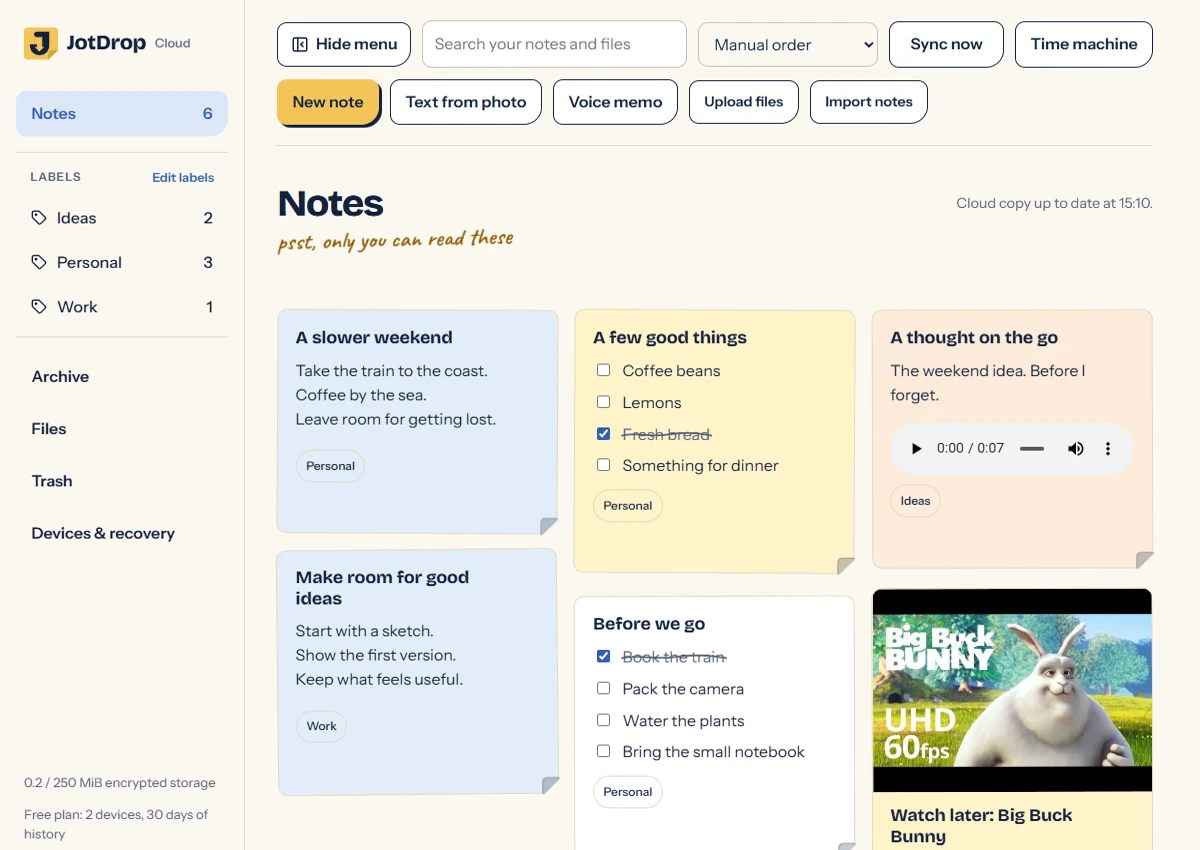
The important differences are practical. JotDrop has no native iPhone app and no real-time collaboration. Its Android app is distributed through GitHub releases. The web app needs JotDrop Cloud and provides ZIP export rather than direct access to local .md files. Its Chrome clipper requires the Obsidian desktop plugin.
That makes it a plausible personal Keep replacement, not a replacement for every Keep household. If you and another person edit the same list, do not migrate that list into an app without the collaboration you need.
For iPhone users wanting a visual layout, Apple Notes documents Gallery view, alongside checklists and pinned notes. It is another option to inspect before deciding that a card layout requires a new service.
Try the ordinary tasks first. Make a note one-handed. Add a photo. Find yesterday's list. An app that performs well in those moments is more useful than one whose settings page wins the comparison.
Which alternative offers more privacy?
First decide what "more privacy" means to you. Keeping notes off a provider's servers is different from syncing encrypted content that the provider cannot decrypt.
Notesnook documents end-to-end encryption enabled by default across its desktop, mobile and web apps. Its current pricing page places unlimited notes and devices on Free, but checklists and other advanced editing features in a paid plan. Check the feature you use, not only the word "free".
Standard Notes is another candidate for simple private text notes. Its Free plan includes encrypted sync and plain-text editing; richer editors are paid. If your current notes are mostly sentences rather than decorated documents, that narrower editor may be enough.
Joplin offers E2EE for synchronisation, but you must enable it. It suits readers willing to make that setup decision rather than assuming encryption is active from installation.
JotDrop's optional Cloud encrypts notes and synced attachments on the device before upload, on Free as well as Plus. Local Markdown files are not automatically encrypted. Account and billing data and some operational metadata remain outside the content-encryption promise.
For recovery caveats, read our encrypted note apps comparison. We also explain Keep's privacy model. Google's own documentation says Keep does not use your content for advertising. It does not establish that employees routinely read notes.
What should you choose if you are on iPhone?
If a native iPhone app is a requirement, JotDrop is not the right choice. On iPhone you have the web app, which needs JotDrop Cloud, or the plugin inside Obsidian's iOS app. Choose on what exists today, not on what may come later.
Apple Notes is a sensible first candidate for checklists, photos, scanned documents and pinned notes. Check the account holding your notes: Apple says many features require iCloud Notes or notes stored on the device, rather than notes in another email provider's account.
If provider-blind encryption is the reason for switching, ordinary iCloud storage is not enough. Apple documents Notes E2EE under Advanced Data Protection, which must be enabled. Its current UK notice says new UK users cannot enable ADP, so that route is closed to them.
For an iPhone alongside non-Apple computers, compare Notesnook's supported platforms and Standard Notes' downloads. Both publish native iOS and desktop options. Try the phone app itself before moving your archive; a browser demonstration is not a substitute for your daily capture routine.
What if you need shared lists?
Staying with Keep may be the simplest choice. Google documents sharing notes and lists with people who can edit them. It also lets you remove collaborators. Switching merely to replace a familiar icon is unlikely to justify rebuilding a working household routine.
For an Apple-based household, Apple Notes supports collaboration. Follow the instructions for your actual operating-system version: the current guide distinguishes newer link-sharing controls from earlier collaboration flows. Locked notes cannot be used for collaboration while locked.
If you also require E2EE for shared Apple notes, Apple says all participants need ADP enabled. "Anyone with the link" sharing does not receive that protection. Sharing convenience and encryption settings need to be checked together.
For more involved teamwork, Notion documents page-sharing permissions, including editing, commenting and view-only access. That may suit a shared project better than a quick shopping list. It is not being recommended here as an E2EE alternative; its security page documents transit and at-rest encryption.
JotDrop is not the answer to a real-time shared-list requirement. Syncing your own devices is not the same as collaborating with someone else.
Which apps give you your own files?
Ask two separate questions: "Can I export?" and "Are the files already mine to work with?"
Obsidian stores its note data in local Markdown files and properties. JotDrop's Android app and Obsidian plugin also work with local .md files. These approaches fit someone who wants ordinary files as the working collection, not just a download at departure time.
By contrast, Joplin documents a local database and export options. That is still a route to portable copies, but it is not the same working arrangement.
Apple's current Mac guide supports Markdown and PDF export. Notion supports Markdown and CSV export, while warning that uploading an export does not instantly recreate the workspace. So both give you a way out, even without a working folder of files.
With a file-based setup, choose one sync method for each folder. Do not run JotDrop Cloud alongside another sync system over the same notes. Obsidian's sync guide also warns against overlapping services and describes platform restrictions. A folder you can see on a computer is not automatically available to every phone app.
What if you want a bigger knowledge base?
Choose Obsidian if you want local files with structured views, and Canvas if arranging and connecting material visually helps. Our Keep-style Obsidian setup explains where cards, daily capture and the JotDrop plugin fit.
Choose Notion's databases if you want pages organised through properties and multiple views, particularly alongside its documented collaboration tools. A database item is a page, which suits work that has grown beyond a short note.
Neither choice requires turning every passing thought into a project record. Keep an easy inbox. If capturing a sentence means deciding on a status, category and relationship first, your setup may be serving the system rather than you.
It is also reasonable to keep short-lived lists in one app and substantial research in another. Give each app a clear job so you do not need to search both for everything.
How much would JotDrop cost?
The published Free and Plus plans, checked on 30 October 2026, differ in Cloud capacity rather than whether encryption is included.
Free costs EUR 0: 250 MB encrypted Cloud storage, two connected devices, 25 MB per synced file and 30 days of Time Machine history. Plus costs EUR 3.99 per month: 10 GB, no plan limit on devices, 200 MB per synced file and full available history.
Both include OCR, tags and labels, voice memos, photos and attachments, checklists, search, colours, pins, archive and trash. Recurring reminders and supported-device speech-to-text are Android features, not a promise of identical capabilities everywhere.
Time Machine restores an earlier saved board state only while its versions remain available. A restore can change or remove notes that were absent from that state. Keep a separate backup instead of treating history as unlimited protection.
How do you move without losing anything important?
No comparison can promise a lossless migration between different apps. Use a reversible process instead.
- Export Keep through Google Takeout and retain the untouched ZIP files.
- List the details you must preserve: text, images, completed tasks, dates, labels and any shared access or reminders.
- Import a small, varied sample into your chosen app. Inspect the result rather than relying on a success message.
- Recreate unsupported features explicitly. For JotDrop, reminders and collaborators do not transfer.
- Make the full import, compare it with the source, and keep the original account until you are satisfied.
The step-by-step Keep export guide explains the export, what the archive contains and how to check it.
FAQ
Do I need a paid Obsidian licence for work notes?
Obsidian says commercial use is free; its commercial licence is optional. Sync is a separate paid service. Check your workplace's rules before putting work material in any personal vault.
Should I try unfamiliar apps with sensitive notes?
Start with invented content that resembles your real notes. Include a checklist, an image and a long passage. You can assess the basic workflow without handing over private information. Do not use passwords or recovery codes as test material.
Does open source mean an app has passed a security audit?
No. Inspectable code and an independent audit are separate things. JotDrop's MIT-licensed source is available, but we do not claim an independent security audit for it. Look for a named report and scope when an app makes an audit claim.
Sources
- https://jotdrop.net/#pricing and https://github.com/Diexar-Labs/jotdrop: JotDrop identity, plans, files, migration, encryption and platform limits.
- https://support.google.com/keep/answer/6101196?hl=en: shared notes and collaborator controls.
- https://support.google.com/keep/answer/10431250?hl=en: Keep content processing and advertising statement.
- https://support.google.com/accounts/answer/3024190?hl=en: Takeout export procedure.
- https://support.apple.com/en-us/118442: Apple Notes features, Gallery view and account differences.
- https://support.apple.com/en-us/102462: collaboration, operating-system differences and locked-note restriction.
- https://support.apple.com/en-us/102651 and https://support.apple.com/en-gb/122234: ADP scope, sharing conditions and UK restriction.
- https://support.apple.com/guide/notes/import-export-and-print-notes-not201900c07/mac: current Mac export formats.
- https://notesnook.com/downloads and https://notesnook.com/pricing/: platforms, default E2EE, free limits and paid checklists.
- https://standardnotes.com/plans and https://standardnotes.com/download: free plain-text editing, E2EE and platforms.
- https://joplinapp.org/help/apps/sync/e2ee/: manual E2EE configuration.
- https://joplinapp.org/help/faq/ and https://joplinapp.org/help/apps/import_export/: database storage and export.
- https://obsidian.md/help/bases and https://obsidian.md/help/plugins/canvas: files, structured views and visual planning.
- https://obsidian.md/help/sync-notes and https://obsidian.md/license: sync restrictions and free commercial use.
- https://www.notion.com/help/sharing-and-permissions and https://www.notion.com/help/intro-to-databases: collaboration and database pages.
- https://www.notion.com/help/export-your-content and https://www.notion.com/security: export limitations and documented encryption.