 JotDrop
Is Google Keep private? What Google's documents say
Is Google Keep private?
Google Keep notes are private from other users unless you share them, and Google says data is encrypted in transit and at rest. That is not a promise that only you can decrypt it: Google documents content processing for Keep features, rather than an end-to-end encrypted notes service.
That answer follows Google's Keep privacy page, checked on 30 October 2026. We make a competing notes app, which appears near the end. The aim here is to explain Google's own statements, not turn a shopping list into a security emergency.
What does Google Keep encryption actually protect?
Google says Keep data is encrypted in transit and at rest. Those terms describe different parts of the journey.
Encryption in transit protects data as it travels across a connection. Encryption at rest protects stored data. Neither phrase, on its own, says that the service operator lacks the means to decrypt it.
End-to-end encryption adds a different boundary: the content is encrypted on a user's device, and the service carrying or storing it does not hold the content-decryption key. For a concrete example of that distinction, Google's own client-side encryption documentation describes encryption before upload with keys controlled by the customer's organisation, not Google.
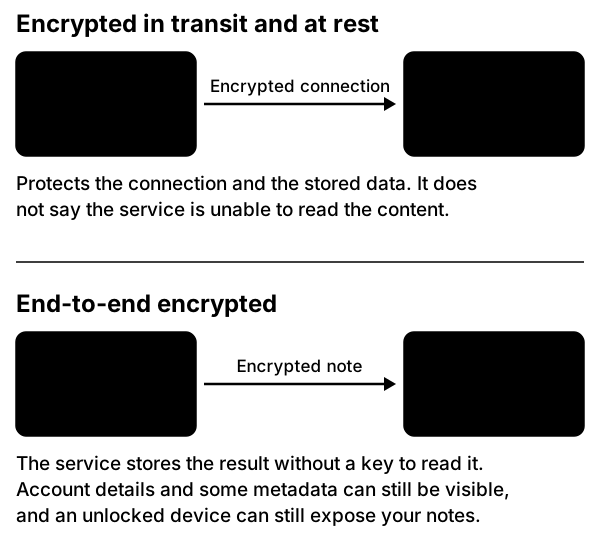
The useful question is who controls access to the keys. A padlock in a browser tells you about a connection. It does not answer that question for the notes stored behind it.
Keep's documented protections are meaningful. They simply do not establish the stronger promise that Google cannot process note content.
Can Google read my Keep notes?
Google's documentation says it processes Keep content to provide features such as handwriting recognition and searching notes by category. It also says it collects performance data for reliability, troubleshooting, abuse prevention and analysis. Those are Keep-specific statements, not guesses based on Google's business model.
So, if you mean "is Google technically excluded from processing the content?", the documented answer is no. If you mean "does a Google employee routinely read my notes?", the page does not establish that. Those are two different claims.
The same page says Google accesses private content only with permission or when required by law. Its general privacy policy describes automated content analysis and circumstances for disclosure, including legal obligations. Read the two documents together.
There is a practical difference between a service having technical access, its rules for using that access, and evidence of someone using it in a particular case. A fair privacy assessment keeps all three separate.
Does Google use Keep notes for advertising?
Google's Keep privacy page says Keep does not use your information for advertising purposes. It labels the section "Keep doesn't use your content for advertising".
That is worth saying plainly. The idea that your Keep shopping list feeds targeted adverts contradicts Google's own page.
The broader Google privacy policy discusses personalised advertising across Google's services. That does not cancel the specific Keep statement. It also does not make Keep a service that processes no data: its own page describes email addresses, performance information and some location information used for account security and service operation.
"Not used for advertising" and "unreadable to the provider" are separate claims. Only the former appears in Keep's product-specific advertising section.
Is Google Keep end-to-end encryption available?
We could not confirm a Keep end-to-end encryption option in Google's current documentation. Keep's privacy page describes transit and storage encryption, plus the content processing discussed above.
Google Workspace does offer client-side encryption for supported services. However, its current support table lists Drive and Docs editors, Gmail, Calendar and Meet. Keep is not listed there.
Buying a Workspace plan is therefore not evidence that Keep notes become end-to-end encrypted. Nor should a security feature for a document, email or meeting be described as protection for a different product.
If your requirement is that Google must not have the content-decryption key, do not assume Keep meets it. Ask for a Keep-specific, documented feature before storing material on that basis.
Are work and school accounts different?
Yes. An organisation-managed account has another party involved: the organisation.
Google's administration documentation says domain administrators can access user accounts and associated data under the customer agreement, and requires a published policy about such access. Keep's privacy page also says an organisation can download your data or limit your ability to download it.
This is not a claim that every manager has a button that opens every note. Permissions, administrative roles and organisational rules matter. It is a reason not to treat a work account as an entirely personal filing cabinet.
For work material, ask which notes service is approved, who can administer it, and what happens when you leave. Moving company information to a personal encrypted app without permission is not a privacy improvement your employer has agreed to.
What can you improve without switching apps?
Start with the risks you can actually reduce. Google's account-security guidance recommends Security Checkup, stronger sign-in protection, software updates and removing unnecessary access.
- Run Security Checkup. Review the account's recovery options and resolve unfamiliar activity.
- Set up a passkey or 2-Step Verification. These address account access; they do not change Keep's content-encryption model.
- Review collaborators on sensitive notes. Google's sharing guide explains how to remove someone and what shared-note editing allows.
- Use a device screen lock and keep the operating system, browser and apps updated.
- Remove browser extensions and connected apps you no longer need.
- Keep a separate copy of material you cannot afford to lose. Our Google Keep export guide covers that process and its limits.
Also separate ordinary notes from secrets. A list of paint colours and a set of account recovery codes do not need the same handling. Decide what you are comfortable keeping with a provider that processes content, rather than assuming every note needs the same answer.
Who is Keep still a reasonable choice for?
Keep is a reasonable choice for ordinary notes and lists if you accept Google's documented processing and account model. For people who need shared household notes, Google documents collaborative editing. There is no need to pretend that convenience has no value.
If excluding the provider from note-content access is a firm requirement, compare apps with documented end-to-end encryption instead.
We make JotDrop. Its optional Cloud encrypts notes and synced attachments on the device before upload, including on Free; the server has no key to read that content. The published privacy limits matter too: local Markdown is not automatically encrypted, account and billing data and some operational metadata remain visible, and a compromised device can expose notes. There is no native iPhone app or real-time collaboration.
FAQ
Does using a VPN make Keep end-to-end encrypted?
No. A VPN does not change which keys the notes service holds. Google's documented Keep model still applies. Choose account and content protections according to the risk, not the number of security products installed.
Does archiving a note make it more private?
Do not treat archiving as an access-control change. Google documents removing collaborators separately. Review sharing explicitly instead of relying on a note disappearing from your main view.
Is a downloaded backup protected by my Google login?
Once downloaded, protect the archive wherever you store it. Google advises choosing a safe location and avoiding shared export folders. A local file is another copy of your information, not merely a shortcut to the account.
Sources
- https://support.google.com/keep/answer/10431250?hl=en: Keep encryption, processing, advertising, private content and organisation controls.
- https://policies.google.com/privacy?hl=en: general automated processing, legal disclosure and managed-account context.
- https://knowledge.workspace.google.com/admin/security/protect-your-organizations-data-with-cse: client-side encryption model and supported services.
- https://knowledge.workspace.google.com/admin/compliance/how-google-protects-your-organizations-security-and-privacy: administrator access and organisational policies.
- https://support.google.com/accounts/answer/46526?hl=en: account-security recommendations.
- https://support.google.com/keep/answer/6101196?hl=en: collaboration, removal of collaborators and personal archive state.
- https://support.google.com/accounts/answer/3024190?hl=en: export storage precautions.
- https://jotdrop.net/#privacy: JotDrop's Cloud protection and stated limits (our own product).